
A 3D printer is usually the better desktop tool for additive parts with complex internal geometry, while a CNC machine is usually the better tool for cutting rigid stock to tighter documented tolerances and smoother machined surfaces. The correct choice changes with the exact project, machine, material and acceptance criteria. This comparison follows purpose, materials, precision, design complexity, speed, cost, skill level, maintenance and workspace needs. Exact capability belongs to the named machine and source, never to an entire process category.
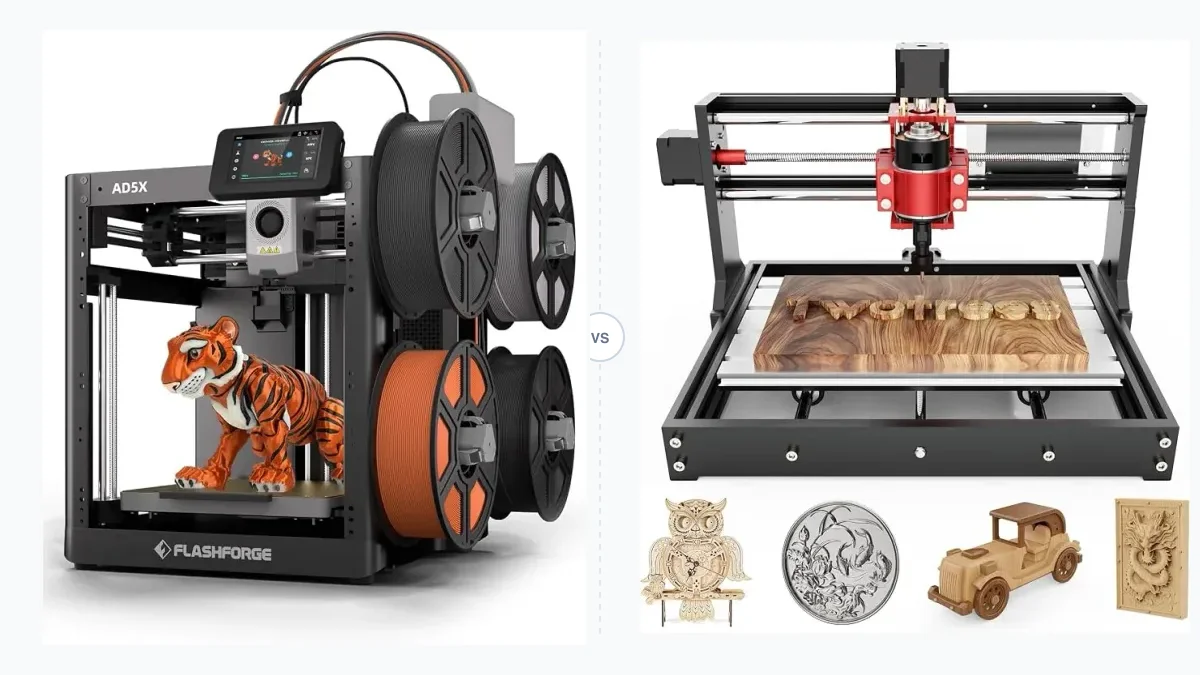
The image represents a desktop 3D printer and CNC machine comparison. It does not establish a capability, tolerance or result.
Which tool is the better fit for your project?
Choose a 3D printer for parts defined by additive geometry and choose a CNC machine for parts defined by machinable stock, tool access, tolerance and surface requirements. A project-first guide should establish the part, material and workspace before a model is selected. Our desktop 3D printer buying guide covers that printer-side decision.
The main project-fit choices are listed below.
- Choose 3D printing for a one-off prototype with enclosed channels or lattices, unless supports, cleaning or material limits make the design impractical.
- Choose by documented dimensional performance for a functional fit, because neither the word “CNC” nor a printer’s layer height proves finished-part tolerance.
- Choose CNC for flat and 2.5D cutting when the stock, cutter and workholding suit the geometry, unless tool access or clamping blocks a required feature.
- Choose CNC for a part that must retain the properties of compatible rigid stock, unless the desktop machine lacks the spindle, rigidity or controls for that stock.
- Choose by repeat quantity only after setup and cycle assumptions are defined, because additive nesting and machining fixtures change the crossover.
- Choose by learning and workspace limits when either process exceeds the available guarding, ventilation, cleanup, noise or supervision capacity.
This decision narrows the comparison to a specific process and machine class. The same project can use both when printed fixtures and machined faces solve different requirements.
How do 3D printing and CNC machining differ at a glance?
3D printing adds material layer by layer, whereas CNC machining removes material from solid stock with controlled cutting tools. The National Institute of Standards and Technology defines additive manufacturing through successive material addition and contrasts it with cutting material away. Autodesk’s subtractive manufacturing setup documentation defines stock, fixtures, work coordinates and post-processing as separate parts of a machining setup.
| Attribute | Desktop 3D printer | Desktop CNC machine |
|---|---|---|
| Process | Adds compatible feedstock or cures resin in layers | Removes material with a rotating cutter |
| Starting material | Filament or liquid photopolymer for the desktop classes covered here | Compatible solid stock such as wood, plastic or selected nonferrous metal |
| Geometry access | No cutter-access requirement, but overhangs and trapped material still matter | Cutter reach, axis count, fixture clearance and workholding govern access |
| Material range | Exact printer, hotend or resin system controls compatibility | Spindle, cutter, rigidity and chip or dust control govern compatibility |
| Tolerance evidence | n/a at category level | n/a at category level |
| Surface finish | Layer or pixel process may remain visible; finish is process and settings dependent | Cutter marks remain possible; finish depends on tool, path, stock and setup |
| Setup | Slice, prepare material, calibrate and prepare the build surface | Create CAM, select tools, hold stock, set work coordinates and verify clearance |
| Per-part time | Geometry, layer settings, material and quantity control time | Material removal, tool changes, feeds, speeds and setups control time |
| Waste | Supports, purge material, failed parts and resin-cleaning waste | Chips, dust, offcuts, worn tools and coolant where applicable |
| Safety | Hot surfaces, moving axes, emissions and material-specific handling | Rotating cutters, workholding failure, chips, dust and machine motion |
| Workspace | Machine footprint plus material, ventilation and post-processing space | Machine envelope plus access, guarding, extraction and stock storage |
| Total-cost variables | Printer, feedstock, support equipment, wear parts, finishing and labor | Machine, cutters, collets, workholding, stock, waste control and labor |
These comparisons define the evidence needed before a purchase. More desktop 3D printer comparisons use the same attribute-first method. Geometry is the next filter because adding material and reaching material with a cutter impose different design limits.
What shapes and parts can each machine make?
3D printing favors enclosed cavities, lattice structures and shapes that are difficult to reach with a cutting tool, while CNC machining favors geometries that remain accessible to the selected tool and workholding setup. NIST’s additive design guidance summary names partially hollow and mesh-like structures among additive design opportunities.
Additive freedom still has boundaries. FDM overhangs may need support material, orientation changes or divided parts. Resin parts need drainage and cleaning access where uncured resin could be trapped. The printable shape must fit the build volume and remain suitable for the selected feedstock and process.
CNC geometry is constrained by cutter diameter, flute length, holder clearance, machine travel and fixturing. A three-axis router reaches features visible from an available tool direction; another setup may be needed for the opposite face. Deep pockets and sharp internal corners can demand smaller or longer tools, which changes rigidity and cutting conditions. The geometry decision therefore leads directly to the material form each machine accepts.
Which materials can 3D printers and CNC machines process?
Desktop 3D printers process compatible filament or photopolymer systems, while desktop CNC machines cut compatible solid stock selected for the spindle, tool, rigidity and dust or chip controls. Material compatibility is a machine-level claim, not permission to load every member of a material class.
| Material class | 3D-printer evidence required | CNC evidence required |
|---|---|---|
| Thermoplastic filament | Manual lists the polymer plus nozzle, bed, enclosure and nozzle-material conditions | Machine and cutter documentation support the plastic stock and chip behavior |
| Photopolymer resin | Printer and resin documentation match wavelength, exposure workflow and handling | Machining is evaluated only after the resin is fully cured and a source supports the operation |
| Wood | Filled filament is a composite feedstock, not solid lumber | Router documentation, cutter choice and local dust extraction cover the stock |
| Machinable plastic | Solid sheet or block is outside ordinary filament or vat feedstock | Machine documentation covers the plastic, cutter and workholding |
| Nonferrous metal | Ordinary desktop FDM or resin capability: n/a | Exact desktop mill, tool, stock and cutting parameters must support it |
NIST lists material extrusion and vat photopolymerization as separate additive technologies. A metal-capable industrial additive system does not make a consumer filament printer metal-capable. The same boundary applies to CNC: a small wood router and a rigid enclosed mill are different machine classes.
Which process is more precise?
CNC machining generally supports tighter documented dimensional tolerances and smoother machined surfaces, but the valid comparison depends on the exact machine, process, material, feature size and setup. Accuracy is closeness to a target. Precision is closeness among repeated results. Repeatability describes repeated motion or output under stated conditions. Tolerance is the acceptable dimensional range. Resolution or layer height is a commanded increment, not finished-part accuracy. Surface roughness is a measured texture value, not a synonym for tolerance.
| Example | Published metric | What the metric supports | What it does not prove |
|---|---|---|---|
| Anycubic Kobra S1 | X/Y/Z positioning accuracy of 0.0125/0.0125/0.0008 mm in the official manual | A controller and motion-system positioning specification | Finished-part dimensional tolerance, surface roughness or material shrinkage |
| Bantam Tools Desktop CNC Milling Machine | Repeatability of +/-0.001 in, or +/-0.0254 mm | The manufacturer's stated machine repeatability | Every feature on every material, cutter or setup |
The Kobra S1 manual and Bantam Tools machine specifications use different metric labels. The figures cannot be ranked as if both were finished-part tolerance. A purchase comparison needs an acceptance drawing, a named feature, measurement method, material, orientation, cutter or print settings and repeat count.
How do setup time, cycle time and production quantity compare?
3D printing often reduces fixturing and manual setup for one-off complex parts, while CNC machining can remove material quickly after programming, workholding and tool setup are complete. Both begin with a usable digital model. The printer workflow adds slicing, orientation, supports, material preparation, calibration and build-surface preparation. The CNC workflow adds CAM operations, cutter data, stock definition, workholding, work coordinates, simulation and a machine-specific post processor.
Cycle time starts after setup, so a quoted travel or maximum print speed is not job time. Finishing extends both workflows through support removal, washing and curing, deburring, sanding or inspection. Repeat batches change the balance: a proven fixture and toolpath can distribute CNC setup across many parts, while a printer can place multiple parts on a build plate with shared setup. A time claim needs geometry, material, quality settings, quantity and all manual steps. Those hours become an input to cost.
Which costs less to buy and operate?
Neither process is universally cheaper because total cost includes the machine, required support equipment, material or stock, tooling, waste, maintenance, energy and operator time. A useful worksheet separates upfront cost, per-job cost and ownership cost.
| Cost group | 3D printer inputs | CNC inputs |
|---|---|---|
| Upfront | Printer, ventilation or enclosure, resin wash and cure equipment where required, tools and storage | Machine, enclosure or guarding, extraction, collets, cutters, workholding, probing and stock storage |
| Per job | Feedstock, supports, purge, cleaning supplies, failed-part allowance, finishing and labor | Stock, cutter wear, chips or dust disposal, finishing, inspection and labor |
| Ownership | Nozzles, build surfaces, release film, lubrication, filters, software or network needs and downtime | Cutters, collets, spoilboards, lubrication, extraction service, calibration and downtime |
Use current exact-model and exact-accessory prices on the purchase date. This page omits a category price range because no stable range describes all desktop printers and CNC machines. Payback requires part volume, scrap rate, labor rate, energy rate and an alternative production cost. Without those assumptions, a return-on-investment percentage is not reproducible.
Which machine is easier for a beginner to learn?
A desktop 3D printer usually has the shorter path to a first plastic part, while CNC learning adds tool selection, feeds and speeds, workholding and collision-aware CAM. The printer still requires model preparation, slicing, material selection, build-surface control and maintenance. Resin printing adds liquid handling, washing and curing.
Desktop CNC difficulty comes from the consequences of a wrong setup. Autodesk’s workflow defines the work coordinate system, stock and fixture before post-processing. A wrong origin, loose clamp, unsuitable cutter or incorrect cutting load can damage stock, a tool or the machine. “Is CNC harder?” has a qualified answer: CNC usually has more setup variables before the first safe cut, while a difficult printer material or resin workflow can exceed a simple CNC engraving task.
Beginner fit is measured by the complete supervised workflow. Compare documentation, setup sequence, recovery from failure, cleanup, access to wear parts and the space needed to control hazards.
What workspace, safety and maintenance does each require?
Both machines require manufacturer-defined operating space and supervision, but CNC adds cutting-tool, workholding, chip and dust controls while 3D printing adds hot-surface, moving-axis and material-specific ventilation or resin-handling controls. The exact manual and material safety data sheet govern the installed machine.
OSHA’s machine-guarding guidance identifies rotating parts, flying chips and sparks as hazards and includes milling machines among equipment needing point-of-operation guarding. OSHA’s wood-dust guidance places local exhaust near the source and describes router dust collection. These controls affect enclosure size, access and maintenance.
NIOSH’s safe 3D printing guide addresses makerspaces, schools, libraries and small businesses. NIOSH treats ventilation and material selection as process-specific controls. Resin work adds gloves and eye protection specified by the resin SDS, controlled washing, curing and waste handling.
Maintenance follows the machine design. Printers need nozzle or release-film inspection, build-surface care, motion cleaning and lubrication. CNC machines need cutter and collet inspection, workholding checks, chip or dust removal, lubrication and extraction service. Noise belongs to the exact documented operating condition, so no category noise figure is assigned here.
What are the disadvantages of each process?
The disadvantages of 3D printing center on process-dependent anisotropy, supports, finish and material limits, while CNC disadvantages center on tool access, workholding, waste, noise and setup complexity. The limitation that matters is the one that conflicts with the part drawing, material, quantity or workspace.
What are the limitations of desktop 3D printing?
Desktop 3D printing does not guarantee isotropic strength, dimensional accuracy or a finished surface. Layer orientation changes load paths in material-extrusion parts. Supports can mark a surface and add removal time. Resin printing can create fine features, yet a screen label or XY pixel size does not prove a finished dimension. Feedstock selection remains limited by the exact hotend, enclosure, nozzle material, resin wavelength and manufacturer instructions. Shrinkage, warping, exposure, cooling, orientation and calibration can change the part, so a functional fit needs measured verification against its acceptance criteria.
What are the limitations of desktop CNC machining?
Desktop CNC machining does not eliminate tool-access, workholding, stock, rigidity or operator-safety constraints. A cutter needs a reachable path and clearance for its holder. The stock needs clamping that resists cutting forces without blocking the toolpath. Small machines differ in spindle power, stiffness and supported materials. Sharp internal corners are limited by cutter radius. Multiple faces may require new setups and new error sources. Chips, dust, worn tools and offcuts remain part of the workflow even when the finished surface needs little post-processing.
Which machine should you choose?
Choose the process whose documented material, geometry, tolerance, batch, workspace and cost limits match the part you need to make. Start with the drawing and acceptance criteria. Select a compatible material form. Reject a process when the geometry, build or work envelope, documented dimensional performance, surface requirement or safety controls fail the project.
Verify these items before purchase:
- Exact machine variant and current manual.
- Usable build or work envelope for the oriented part and fixtures.
- Supported material with required nozzle, cutter, enclosure or extraction.
- Published accuracy, repeatability or tolerance metric with its definition.
- Setup, cycle, finishing and repeat quantity assumptions.
- Full workspace, safety, maintenance and support-equipment cost.
After that checklist, terminology matters because both systems move axes under computer control.
Is a 3D printer a CNC machine?
A 3D printer uses computer numerical control, but in ordinary product and manufacturing usage it is classified as an additive-manufacturing machine instead of the subtractive machine usually meant by “CNC machine.” Both systems interpret digital instructions and coordinate axis motion. Their material actions separate the conventional classes: a printer deposits or cures material, while a mill or router removes stock with a cutter. NIST’s additive definition and subtractive examples support that classification. Shared control concepts do not make the machines interchangeable because structure, tooling, debris control and safety requirements differ.
Can a 3D printer be converted into a CNC machine?
A motion platform can sometimes accept a cutting attachment, but a typical 3D printer is not engineered as a safe, rigid CNC mill. Cutting places lateral load on the frame, bearings and tool mount. A CNC spindle, collet, workholding system, chip containment, emergency stop and guarding address hazards that an extrusion toolhead does not create. Firmware motion is only one requirement. A conversion can void manufacturer support and expose moving parts or electronics to debris. This page does not provide conversion instructions because the original machine manual controls permitted use.
When does using both processes make sense?
Using both processes makes sense when printed prototypes, jigs or fixtures reduce setup while machined surfaces provide the required fit or finish. One workflow prints a shape prototype before stock and cutter time are committed; the machined revision then supplies the specified material and mating surfaces. Another workflow prints a low-load drill guide or soft jaw pattern, then uses CNC for the final stock part. NIST describes hybrid additive and machining as complementary process classes, but a desktop workflow still needs a documented material, safe fixture and measured acceptance check.
What other desktop fabrication tools should you compare?
A 3D pen and a laser cutter solve different design and fabrication tasks from either a desktop 3D printer or a CNC machine. A 3D pen comparison focuses on handheld extrusion and freeform control; the focused guide is 3D Printer vs. 3D Pen: Which Tool Is Right For You?.
A laser cutter comparison focuses on beam-accessible sheet cutting and engraving rather than spindle cutting or layer deposition. Those differences are covered in 3D Printer vs Laser Cutter: Uses, Materials and Cost.