
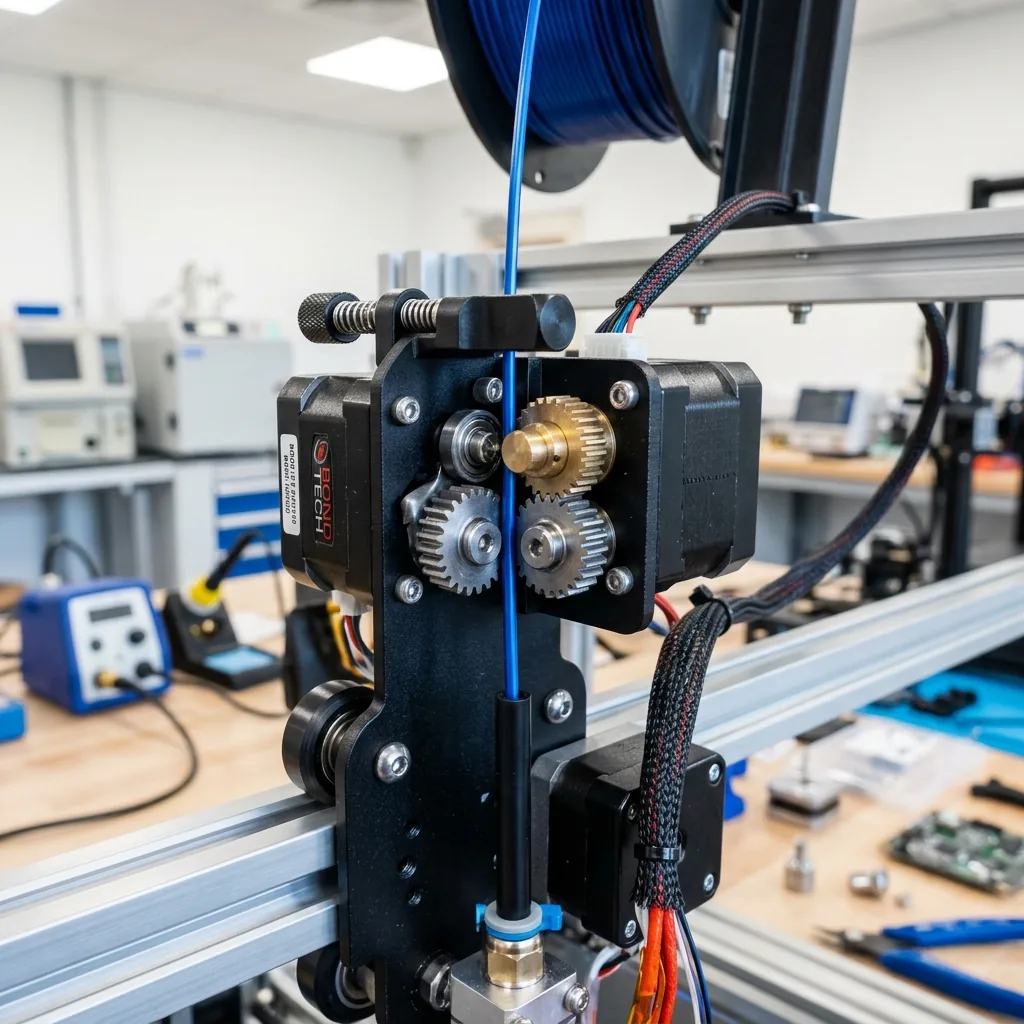
A PTFE tube or heatbreak must be replaced with a component that matches the printer’s filament path, hotend design and documented temperature range. Identify the architecture, source the exact part, make the printer safe, remove the old component, prepare and seat the replacement, reassemble by the service procedure, and verify extrusion. Generic hotend instructions do not fit every design.
Which PTFE tube and heatbreak design does your printer use?
Identify where PTFE ends relative to the heated zone before selecting a part or following an installation method. The name “PTFE tube” may describe an external Bowden path, an internal hotend liner or a short guide used elsewhere in the feed system.
| Design | PTFE location | Heatbreak relationship | Evidence needed |
|---|---|---|---|
| External Bowden tube | Runs from feeder to toolhead connector | May stop above the hotend path | Printer routing and coupling diagram |
| PTFE-lined heatbreak | Liner extends into part of the hotend assembly | PTFE endpoint is inside the thermal stack | Exploded hotend drawing |
| Short internal guide | Small tube segment guides filament within a module | May not contact nozzle or heater block | Exact service procedure |
| All-metal heatbreak | Heated filament path contains no PTFE liner | Geometry and surface finish control the path | Hotend manufacturer specification |
Inspect the exploded diagram and part list for the exact model. A 3D printer buying guide explains how Bowden, direct-drive and service-access choices affect ownership, but the printer manual controls the repair.
When should a PTFE tube or heatbreak be replaced?
Replace the component when inspection shows documented wear, deformation, damage or a persistent filament-path fault that correct assembly does not resolve. A clog, stringing or loading error alone does not prove either part has failed.
| Symptom or evidence | What it supports | What to rule out |
|---|---|---|
| Tube end is deformed, scored or no longer square where a square seat is required | Tube replacement under the maker’s criteria | Incorrect cut or installation method |
| Coupling no longer retains the specified tube | Coupling or tube wear diagnosis | Missing clip or incorrect release procedure |
| Heatbreak threads, bore or mating surface are damaged | Exact heatbreak replacement | Nozzle obstruction or loose assembly |
| Repeated path gap appears after correct assembly | Dimensional or compatibility mismatch | Wrong insertion depth or fastening sequence |
| Generic under-extrusion or stringing | Further diagnosis only | Material, nozzle, drive and profile causes |
Use inspection evidence and the service limit published for the part. Do not convert an online replacement interval into a universal lifespan.
What specifications must match before you buy a replacement?
The replacement must match the exact printer or hotend, tube dimensions, coupling, heatbreak geometry, heater-nozzle stack and supported material temperature. A similar-looking tube or threaded part does not establish compatibility. Confirm these compatibility fields.
- Printer model, revision and toolhead or hotend version.
- Manufacturer part number and approved substitute list.
- Tube inside diameter, outside diameter, grade, cut length and documented bend requirement.
- Coupling type, collet, retaining clip and supported insertion depth.
- Heatbreak thread, length, bore, material and cold-side engagement.
- Compatible heatsink, heater block, nozzle and thermal sensor arrangement.
- Published temperature rating for the exact tube in its installed location.
- Required torque, hot or cold tightening state and post-service firmware step.
Keep X placeholders in an editorial worksheet until each value is taken from the exact maker source. Do not fill dimensions, torque or temperature from a visually similar hotend.
How do you remove the old PTFE tube safely?
Remove the PTFE tube only after following the manufacturer’s unloading, cooling, power and connector-release procedure. Some systems require a controlled temperature for filament unloading, while access and disassembly occur after cooling and power isolation.
Use this removal sequence only as a routing framework.
- Identify the printer, hotend and PTFE path from the service diagram.
- Unload filament by the exact menu or manual process, including any documented temperature state.
- Cool, shut down and unplug the printer when the service instructions require it.
- Remove covers without pulling fan, heater or thermal-sensor wires.
- Release the collet, clip or fitting by its documented method while supporting the connector.
- Mark orientation and installed depth when the procedure asks for a reference.
- Withdraw the tube along its path without twisting a fixed fitting or scraping a sealing surface.
- Inspect the removed end, coupling and surrounding path before cleaning away evidence.
Do not heat a hotend for removal unless the exact manufacturer procedure explicitly requires that state. Stop if the tube is seized, wiring blocks access or the manual assigns the operation to service personnel.
How do you cut and seat a PTFE tube without leaving a gap?
A tube end that mates inside the filament path must be square, undamaged and fully seated according to the hotend design. This requirement does not mean every external Bowden tube touches a nozzle.
Prepare and seat the tube with this controlled sequence.
- Confirm the official cut length or installed path for the exact printer.
- Use the cutting tool and support method specified for the tube so the bore is not crushed.
- Inspect the cut face for an angle, burr, oval bore, scoring or contamination.
- Replace the cut rather than sanding or reshaping it unless the manufacturer describes that process.
- Open the connector by its documented collet procedure and insert the tube to the stated stop or depth.
- Pull back only as instructed to confirm retention, then install the correct retaining clip when one is specified.
- Route the tube through the allowed bend and full toolhead travel without tension, kinks or enclosure contact.
- Verify the seated position before replacing covers.
A gap inside a design that requires two mating surfaces creates a pocket where softened filament may collect. The mechanism applies only after the hotend diagram confirms those surfaces. Capricorn’s published installation page is a source for its own tubing workflow; it does not define every printer’s cut length or endpoint.
Record the tube specification, cut length, installed depth and coupling state from the exact source. A square cut supports sealing only when the architecture uses that cut face as a seat.
How do you replace the heatbreak and reassemble the hotend?
Replace the heatbreak with the exact service procedure for the hotend because heater-block orientation, cold-side engagement and tightening method vary. The heater and temperature-sensor wires are fragile and may remain electrically hazardous until power is isolated.
Use the manufacturer procedure to remove the toolhead cover, fan duct, heater block support and any retaining hardware. Support the heater block with the specified tool when loosening parts so torque does not pass through wires or the thin heatbreak wall. Note the orientation and thread engagement before removal.
Compare the old and replacement heatbreak by part number, geometry, bore, threads and mating surfaces. Install the replacement to the documented cold-side depth or stop. Reassemble the nozzle and heater block in the stated order. Apply only the published torque and only in the published hot or cold state. An instruction for one hotend cannot supply torque for another.
Reconnect fans, heater and thermal sensor by the wiring diagram. Restore strain relief and covers before power is applied. Run a thermal calibration, PID routine or firmware step only when the printer or hotend instructions require it. Stop at damaged insulation, loose sensor retention, stripped threads or an unexplained temperature fault.
How do you verify the filament path after reassembly?
Verification confirms unobstructed loading, stable extrusion and the absence of leakage or repeat clogging under the documented profile. Use the exact printer startup and observation method after checking that tools and loose parts are removed. Verification conditions are listed below.
- Record the printer, hotend, part number, tube dimensions, nozzle and firmware version.
- Load the named material through the official process and note any repeatable resistance.
- Use the documented nozzle and material temperature profile without adding a universal value.
- Command the maker’s setup extrusion or other published check and observe the filament path.
- Inspect the heater-block and nozzle area for leakage only from a safe distance under the service instructions.
- Complete the named test print or functional check, then record pass or fail without inventing a duration.
A clean extrusion strand alone does not prove long-term compatibility. The result establishes that the documented profile loaded and extruded without immediate obstruction or visible leakage.
Should you replace like-for-like or convert to an all-metal heatbreak?
Use a like-for-like replacement unless the printer and hotend maker document compatibility with the proposed all-metal conversion. An all-metal filament path changes internal geometry and may change the supported material range, retraction response, thermal behavior and service requirements.
| Decision factor | Like-for-like replacement | All-metal conversion |
|---|---|---|
| Compatibility | Preserves documented architecture | Requires explicit printer and hotend approval |
| Material need | Uses the existing published range | Must match a documented operational need |
| Retraction and profile | Existing approved workflow may remain | Recheck only by official conversion guidance |
| Firmware and thermal checks | Follow standard service steps | Complete every maker-required change |
| Warranty and cost | Compare exact replacement terms | Include parts, service time and support impact |
The total cost of owning a 3D printer includes compatible parts, maintenance time and failed-service risk. The word “upgrade” does not prove that a conversion fits the printer or its intended materials.
What if a new tube or heatbreak still clogs?
A repeated clog after correct replacement indicates another cause or an assembly mismatch, not proof that the new part is defective. Recheck the part number, tube endpoint, coupling retention, heatbreak engagement, nozzle stack and documented fastening state.
Then branch to evidence outside the replacement task. A failed hotend fan or blocked heatsink airflow supports heat-creep diagnosis. A nozzle obstruction supports nozzle service. Feeder damage or path resistance supports drive diagnosis. A material or retraction mismatch supports profile diagnosis. Keep each branch separate and change one variable at a time.
Does every Bowden tube need to touch the nozzle?
No, the required PTFE endpoint depends on the hotend architecture, so the exact service diagram controls. Some PTFE-lined assemblies use a tube-to-nozzle or tube-to-mating-surface relationship. External Bowden and all-metal designs place the endpoint elsewhere. Inspect the drawing before cutting or seating a tube.
Can PTFE temperature advice be generalized across printers?
No, a safe operating statement must identify the tube grade, location, hotend design and manufacturer rating. A tubing datasheet and safety data sheet supply material information, while the printer or hotend maker defines the installed assembly. Do not transfer a bare-tube value into an unverified hotend claim.
What should the service record include?
Record the printer, hotend, part number, dimensions, source, installation values, material profile and verification result. Include tube endpoint, coupling, heatbreak engagement, tightening state and any required firmware step. Related 3D printer repair and maintenance guides helps route later faults without turning this repair into a generic maintenance schedule.