
The Creality Ender 3 and the Ender 5 are desktop 3D printers that differ primarily in frame architecture, vertical build volume, assembly time, and price. Choosing between the Creality Ender 3 vs Ender 5 requires comparing their specifications, evaluating the open frame against the cubic box frame, analyzing print speed capabilities, calculating setup times, and assessing the overall value for money. This guide details the differences between the Ender 3 V3 SE and the Ender 5 S1 to help buyers select the correct machine.
What is the difference between Creality Ender 3 and Ender 5?
The difference between the Creality Ender 3 and the Ender 5 is the physical frame structure and the vertical print capacity. The Creality Ender 5 S1 utilizes a cubic box frame with dedicated stepper motors for the X-axis and Y-axis, yielding a maximum Z-axis build height of 280 millimeters. The Creality Ender 3 V3 SE utilizes an open frame structure with the bed moving along the Y-axis, providing a maximum Z-axis build height of 250 millimeters. According to 3D Print Utopia, the Ender 5 offers greater stability, faster print times, newer technology, and faster setup times. The Ender 3 is a highly affordable entry point that most beginners start with to learn the fundamentals of additive manufacturing.
Both machines function as fused deposition modeling printers that operate with a Sprite Direct Drive extruder. The shared extrusion system allows both devices to handle a wide variety of filaments, including flexible options like thermoplastic polyurethane. However, the varying frame designs dictate how the toolhead and the build plate move during the fabrication process.
Creality Ender 3 vs Ender 5 Specifications Comparison
Comparing the exact specifications of the Creality Ender 3 vs Ender 5 highlights the hardware variations between the two systems. The table below lists the technical parameters for the Ender 3 V3 SE and the Ender 5 S1 based on data from 3D Print Utopia.
| Specification | Creality Ender 3 V3 SE | Creality Ender 5 S1 |
|---|---|---|
| Machine Size | 420 x 366 x 490 mm | 425 x 460 x 570 mm |
| Build Volume | 220 x 220 x 250 mm | 220 x 220 x 280 mm |
| Machine Weight | 7.12 kilograms | 12.1 kilograms |
| Extruder Type | Sprite Direct Drive | Sprite Direct Drive |
| Standard Nozzle | 0.4 millimeters | 0.4 millimeters |
| Layer Thickness | 0.1 to 0.3 millimeters | 0.1 to 0.4 millimeters |
| Print Precision | +/- 0.1 millimeters | +/- 0.1 millimeters |
| Maximum Print Speed | 250 millimeters per second | 250 millimeters per second |
| Normal Print Speed | 40 to 80 millimeters per second | 50 to 100 millimeters per second |
The specifications demonstrate that the Ender 5 S1 is significantly heavier and taller than the Ender 3 V3 SE. Both printers use 1.75-millimeter filament and support STL, OBJ, and AMF file formats. The machines allow printing to continue after a power failure, which prevents long jobs from being lost due to electrical interruptions. Data transfer occurs via Micro SD and USB-C connections on both platforms.
Build Volume and Dimensions
The build volume and external dimensions differ directly between the two printers. The Creality Ender 3 V3 SE has a build volume of 220x220x250 millimeters. The Creality Ender 5 S1 has a build volume of 220x220x280 millimeters. 3D Print Utopia points out that both printers share the exact same 220 by 220 millimeter footprint on the heated build plate. The core difference lies exclusively in the vertical Z-axis, where the Ender 5 provides an extra 30 millimeters of printable height.
The overall machine size also reflects this difference. The Ender 3 V3 SE measures 420 by 366 by 490 millimeters and weighs 7.12 kilograms. The Ender 5 S1 measures 425 by 460 by 570 millimeters and weighs 12.1 kilograms. The cubic frame of the Ender 5 requires more vertical clearance and desk space. For makers who intend to print tall objects like cosplay props or large mechanical parts, the additional 30 millimeters on the Ender 5 S1 prevents the need to split digital models into multiple pieces.
Buyers seeking even larger capacities might consider the Creality Ender 5 Max, which features a massive 400x400x400 millimeter build volume. The Ender 5 Max has an astonishing maximum print speed of 700 millimeters per second and a normal speed of 100 to 200 millimeters per second, according to 3D Print Utopia. The Ender 5 Max also includes a touch screen interface, a filament end sensor, and a removable tempered glass plate instead of the standard dial knob and screen.
Frame Design and Stability
The frame design and resulting stability separate the Ender 5 from the Ender 3. The Creality Ender 5 S1 is built on a solid box frame structure. The Creality Ender 3 V3 SE is built on an open frame design. The box frame of the Ender 5 increases the total size of the machine but results in a highly stable printer that produces less wobble during operation.
According to 3D Print Utopia, the Ender 5 S1 features dedicated stepper motors for both the X-axis and the Y-axis. The toolhead on the Ender 5 moves along both of these axes at the top of the frame, and the Y-axis motor controls both sides of the gantry simultaneously. This three-axis stability reduces vibration artifacts on the surface of printed parts. In contrast, the Ender 3 V3 SE moves the toolhead along the X-axis while the heated build plate moves back and forth along the Y-axis. The Ender 3 V3 SE utilizes dual Z-axis lead screws to ensure high stability on its open frame, compensating for the lack of a full cubic enclosure.
Both the Ender 3 V3 SE and the Ender 5 S1 utilize an upgraded V4.2.2 silent mainboard equipped with TMC2208 stepper motor drivers. These electronic components allow for quiet and precise motion control. Both printers feature a branded Meanwell power supply to efficiently heat the build plate and the hotend.
Print Speed and Quality
Print speed and surface quality relate closely to the mechanical stability of the printer. The Creality Ender 3 V3 SE and the Creality Ender 5 S1 can reach a maximum print speed of 250 millimeters per second. However, running these machines at their absolute maximum speed often degrades the visual quality of the printed object. The Bambu Lab P1S vs Creality K1C: High-Speed CoreXY Face-Off illustrates how enclosed CoreXY machines handle rapid movements, but for the open-format Ender series, conservative speeds yield better results.
3D Print Utopia states that the Ender 3 V3 SE achieves high-quality prints within a normal speed range of 40 to 80 millimeters per second. The Ender 5 S1 achieves high-quality prints within a slightly faster normal speed range of 50 to 100 millimeters per second. The structural stability of the cubic frame allows the Ender 5 to push the toolhead faster without introducing excessive wobble or ringing artifacts into the printed layers. Both the X-axis and Y-axis have dedicated stepper motors on the Ender 5, which significantly reduces the vibration profile during directional changes.
Both printers feature the Sprite Direct Drive extruder, which reduces the distance the filament must travel from the drive gears to the melt zone. This direct drive setup improves the retraction response and the overall extrusion consistency compared to older Bowden tube designs. The direct path makes it possible to print flexible filaments with higher success rates on both the Ender 3 and the Ender 5. The hotend on the Ender 3 V3 SE contains a Bowden PTFE tube inside, which limits the maximum temperature to 250 degrees Celsius. This temperature ceiling restricts the use of high-temperature engineering filaments.
Assembly and Setup Process
The assembly and setup process differs significantly due to the parts included in each kit. The Creality Ender 5 S1 takes an average of 30 to 60 minutes to assemble. The Creality Ender 3 V3 SE takes an average of two to three hours to assemble. 3D Print Utopia notes that the Ender 5 has fewer discrete parts to put together out of the box and includes an updated user manual that aids the process. The instructions provided with the Ender 3 are often lacking, prompting many beginners to rely on video tutorials to complete the construction.
The Ender 3 requires the user to build the frame, attach the Z-axis extrusions, mount the power supply, and route the wiring harnesses. The increased part count extends the initial setup time. Preparing any 3D printer comparison requires acknowledging that the Ender 5 arrives in a more complete state, allowing users to start their first calibration print much sooner. Both machines feature power recovery modes that allow prints to resume after an electrical interruption, preventing material waste.
Both machines feature an auto bed leveling system that utilizes a CR Touch sensor and a strain gauge to compensate for build plate inconsistencies. 3D Print Utopia notes that an unlevel bed causes problems with the first print layer and bed adhesion. Having a printer come preinstalled with the auto-leveling sensor is very convenient and saves a lot of time. Both printers require some tinkering before mastering, and 3D Print Utopia recommends upgrading to a textured PEI magnetic build plate or a glass bed to resolve potential print adhesion difficulties.
Price and Value for Money
Price and overall value for money serve as primary factors for buyers comparing these two machines. The Creality Ender 3 V3 SE typically retails for around 220 dollars. The Creality Ender 5 S1 is typically 150 to 200 dollars more expensive than the Ender 3 model. The higher price of the Ender 5 reflects the larger frame materials, the dual Y-axis motor setup, and the additional Z-axis build volume.
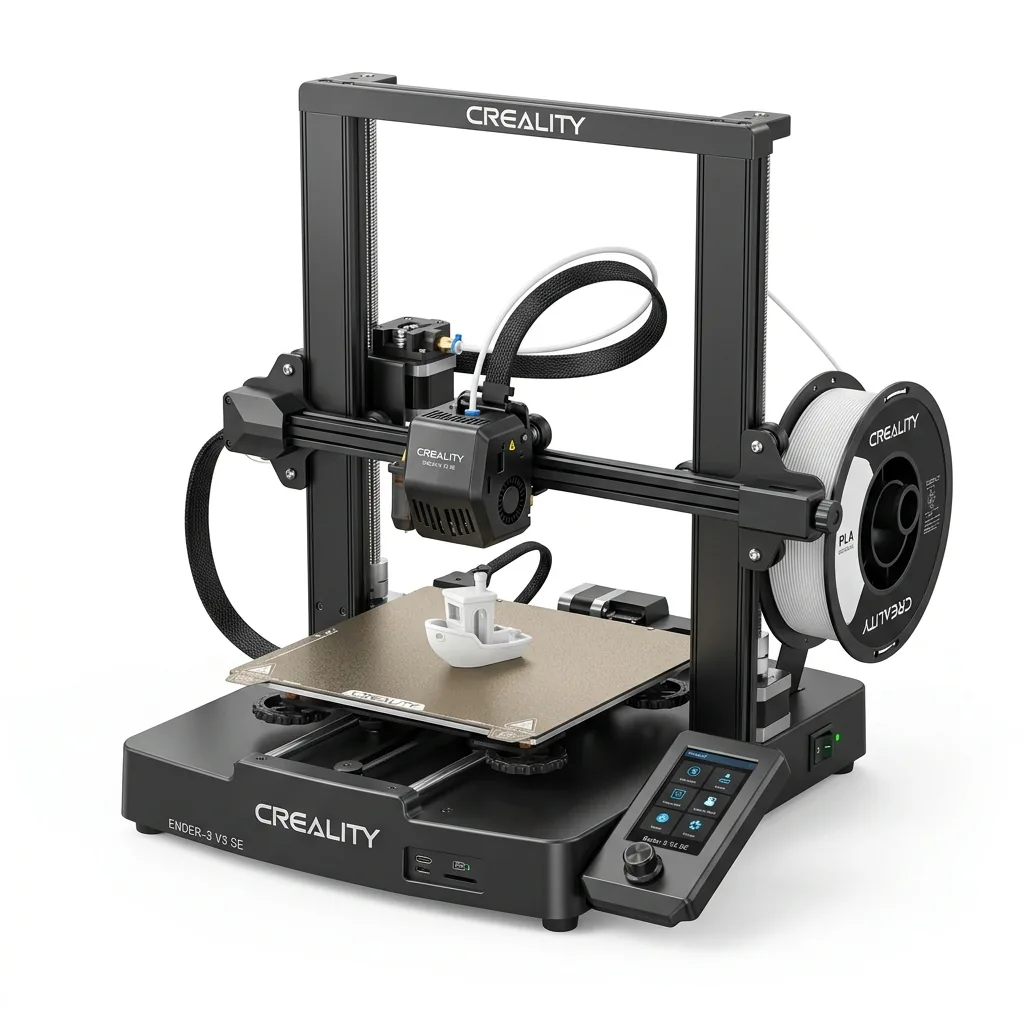
Creality Ender 3 V3 SE 3D Printer
Pros
- Hands-free auto bed leveling and Z-offset calibration
- Reliable Sprite direct drive extruder handles PLA, PETG, and TPU
- Dual Z-axis lead screws ensure high stability
- Incredible sub-$200 value
Cons
- Bowden PTFE inside hotend limits temperature to 250°C
- Open frame not ideal for ABS
The low cost of the Ender 3 V3 SE makes it highly attractive for beginners seeking a capable machine without a massive initial investment. The Ender 3 line has a massive community base and relies on open-source firmware. This makes it easy for users to find troubleshooting help and modification guides. The sheer volume of users means that nearly every problem has been documented and solved on community forums.
3D Print Utopia recommends purchasing through Amazon, as the retailer has a good return policy and customer service compared to ordering directly from the manufacturer website. While purchasing directly from Creality might yield a slightly lower price, the customer service is often lacking and processing returns can take up to a month. The Ender 5 targets users who are willing to spend extra capital upfront to secure a more rigid frame and slightly faster high-quality print speeds.
Is the Ender 5 better than the Ender 3?
The Ender 5 is not objectively better than the Ender 3; the correct choice depends on budget constraints and stability requirements. The Ender 5 S1 provides advantages in mechanical stability, faster assembly out of the box, and a taller build volume. The Ender 3 V3 SE provides exceptional value, identical material compatibility, and a massive community support network for a fraction of the cost.
Buyers who print tall objects or demand high precision at 100 millimeters per second will find the Ender 5 justifies its premium price. Buyers who want to enter the hobby affordably will find the Ender 3 more than capable of producing excellent results. Reviewing additional 3D printer head-to-head comparisons can provide further context on how these Creality models stack up against competing brands in the market.